Tailscale, Pi-hole and a Raspberry Pi: ad blocking everywhere
A mesh network with a Raspberry Pi as exit node and DNS server for ad blocking on every device.
Ads follow you across networks. Coffee-shop Wi-Fi, mobile data, hotel hotspots — none respect your DNS preferences. A Raspberry Pi running Pi-hole fixes this at home. Tailscale extends it everywhere.
This post describes a three-device setup: a Windows laptop, an iPhone and a Raspberry Pi. The Pi sits at home running Pi-hole. Tailscale ties them into a mesh network (a “tailnet”) over WireGuard. The result: ad blocking on every device, on every network, with no port forwarding or firewall rules.
Before you start
You need a Raspberry Pi running Pi-hole and a Tailscale account (the free tier covers up to 100 devices). If Pi-hole is not yet installed, run this on the Pi:
curl -sSL https://install.pi-hole.net | bashInstall Tailscale on each device:
- Windows: tailscale.com/download/windows
- iPhone: App Store
- Android: Play Store
- Linux / Raspberry Pi:
curl -fsSL https://tailscale.com/install.sh | sh
Log in on each device with the same account. They join the same tailnet automatically.
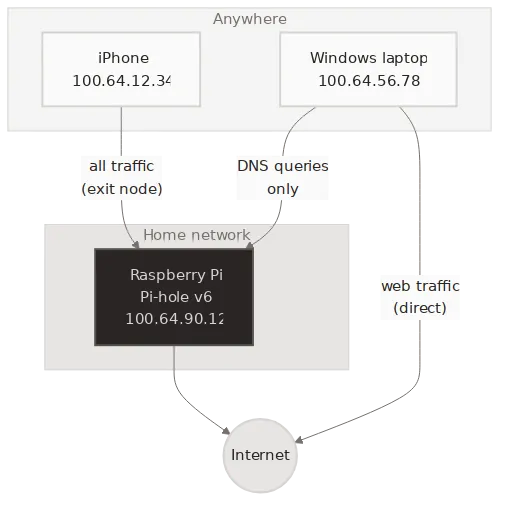
The setup
1. Raspberry Pi (exit node and DNS server)
With Tailscale installed, bring it up as an exit node:
sudo tailscale up --advertise-exit-nodeEnable IP forwarding so the Pi can route traffic:
echo 'net.ipv4.ip_forward = 1' | sudo tee -a /etc/sysctl.d/99-tailscale.confecho 'net.ipv6.conf.all.forwarding = 1' | sudo tee -a /etc/sysctl.d/99-tailscale.confsudo sysctl -p /etc/sysctl.d/99-tailscale.confPi-hole listens on local interfaces by default. Tailscale traffic
arrives on the tailscale0 interface, which Pi-hole treats as
non-local. Change the listening mode in /etc/pihole/pihole.toml:
[dns] listeningMode = "ALL"Then reload DNS and approve the exit node in the Tailscale admin console:
sudo pihole reloaddnsNote
Setting listeningMode to ALL is safe here. The Pi is not
exposed to the public internet — only devices on your tailnet
can reach it.
2. Windows laptop
If you use WSL2, install Tailscale on the Windows host only. WSL2 inherits the host’s network stack — no separate install needed.
3. iPhone
Open the Tailscale app. In the menu, select the Pi as your exit node. All traffic now routes through the Pi.
Two modes, two needs
The phone and the laptop use the Pi differently.
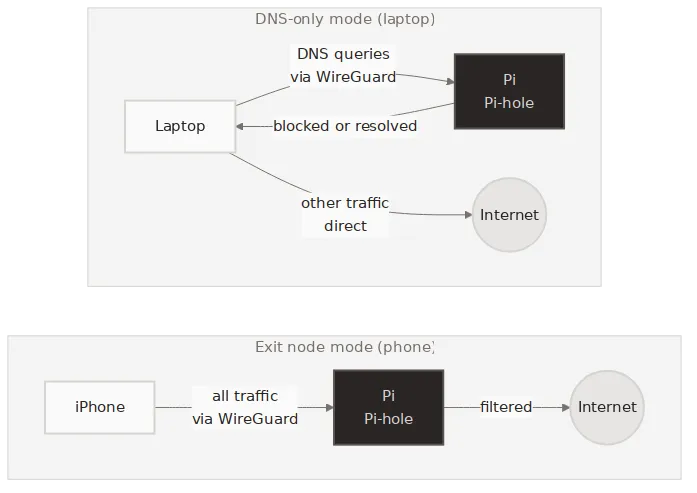
Exit node mode (phone): All traffic flows through the Pi. DNS queries hit Pi-hole and get filtered. Web traffic exits through your home IP. This gives you ad blocking and a consistent IP address on any network. The trade-off is latency — every packet takes a detour through home.
DNS-only mode (laptop): Only DNS queries go through the tailnet. Web traffic goes direct. You get ad blocking without the latency penalty.
To set up DNS-only mode, go to DNS settings in the Tailscale admin console and add the Pi’s tailnet IP as a custom nameserver. Enable “Override local DNS”. Every device on the tailnet now uses Pi-hole for DNS — unless it already routes all traffic through the exit node.
You do not have to pick one mode per device. With tailnet DNS enabled, every device gets ad blocking by default — even with the exit node turned off. Toggle the exit node on when you join a network you do not trust. Turn it off when you are home or on a reliable connection. Ad blocking stays either way.
Verifying it works
Test from any device on the tailnet. Replace the IP below with your Pi’s tailnet address:
dig @100.x.y.z ads.google.comPi-hole blocks the query and returns 0.0.0.0. A normal domain
resolves as expected:
dig @100.x.y.z google.comIf ads.google.com resolves to anything other than 0.0.0.0,
check that Pi-hole’s listening mode is set to ALL and that the
exit node is approved in the admin console.
The devices
| Device | Role |
|---|---|
| Windows laptop | DNS-only client |
| Raspberry Pi | Exit node + DNS server |
| iPhone | Exit node client |
The whole setup takes about 15 minutes. No VPN server to maintain, no certificates to renew, no ports to open. Tailscale handles the WireGuard keys and NAT traversal. Pi-hole handles the ads. The Pi handles both.